
White Label: Change Monsta's logos
The Monsta White Label feature allows you to customize the platform with your own brand, providing a consistent and professional experience for your customers. Instead of displaying Monsta’s original brand, you can replace it with your own to identify your company.
Benefits of the White Label feature
Section titled “Benefits of the White Label feature”- Strengthening your brand: Customizing with your brand creates a unique visual identity, increasing recognition and trust from your customers.
- Consistent experience: Your customers will perceive they are using a product that is entirely yours, without third-party elements, reinforcing your company’s image.
- Professionalism: Customization conveys an image of professionalism and care, showing that your company pays attention to every detail of the customer experience.
- Flexibility: The White Label feature allows you to adapt Monsta to your brand’s visual identity, ensuring seamless integration with your other marketing materials.
How to use the White Label feature
Section titled “How to use the White Label feature”-
Go to the menu Configuration -> Parameters;
-
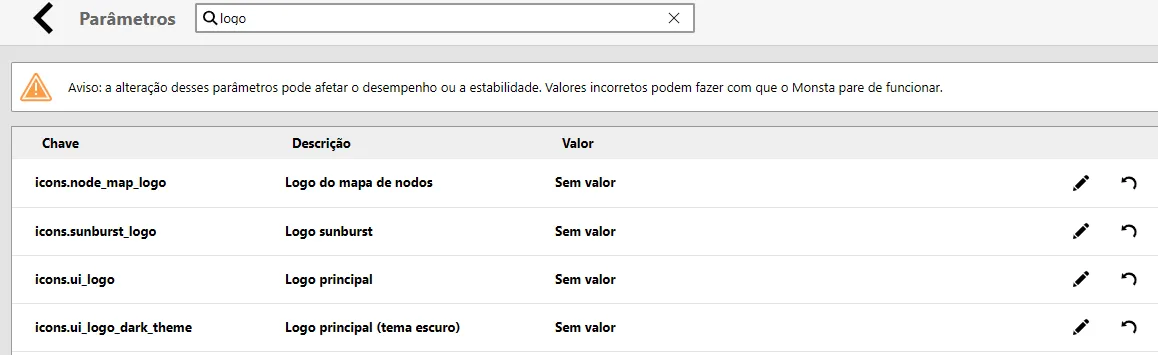
In the “Search” field, filter the content by “Logo”;
-
Click the “Unlock” button;
-
Click the “Edit” button for the image you want to change, then click “Select…”;
-
Upload the image with the new logo;
-
Click the “Confirm” button to save the change.
After this procedure, the new image will be displayed in the selected logo.
Important notes
Section titled “Important notes”- Usage rights: Ensure you have the rights to use the trademarks and logos you will use in the customization.
- Visual consistency: Maintain the visual consistency of your brand across all marketing materials, including the customized software.
By using the White Label feature, you can offer a product with your brand’s visual identity, reinforcing your company’s recognition and your customers’ trust.