
Probe: Installation
A Monsta Probe is a local collection software designed to be installed directly on Windows servers and devices (coming soon for Linux and Raspberry PI). Its main function is to collect performance, health and availability metrics from the host system, acting as a native collection extension for the Monsta platform.
Features and Technical Capabilities
Section titled “Features and Technical Capabilities”1. Passive Architecture (On Demand)
Section titled “1. Passive Architecture (On Demand)”The probe operates strictly under a passive request-and-response model. It does not initiate network communications autonomously; data traffic occurs only when Monsta contacts it to perform polling.
2. Integration with the WMI API (Windows)
Section titled “2. Integration with the WMI API (Windows)”In Microsoft environments, the probe natively uses the WMI (Windows Management Instrumentation) API, allowing extraction of detailed performance counters from servers and workstations without the need for complex remote management configuration on the network.
3. Execution of PowerShell Commands and Scripts
Section titled “3. Execution of PowerShell Commands and Scripts”The probe acts as an automation arm directly on the host operating system.
- Local Commands: It can execute commands directly on the host operating system.
- PowerShell Scripts: It supports triggering custom scripts, enabling monitoring of specific applications or creating tailored validation routines.
4. Physical Disk Health Diagnostics
Section titled “4. Physical Disk Health Diagnostics”The software can read hardware indicators and the integrity status of hard drives and SSDs installed on the device. This enables early identification of physical failures (bad blocks) and storage degradation.
5. Encrypted Communication
Section titled “5. Encrypted Communication”All information exchanged between the Monsta central server and the Probe installed on the device is 100% encrypted, ensuring the security of transmitted metrics and preventing interception of sensitive infrastructure data.
Installing the Probe (Windows)
Section titled “Installing the Probe (Windows)”- Download the probe program on the Windows system you want to monitor;
| Download | |
|---|---|
 | https://www.monsta.com.br/monsta/download/MonstaProbe.msi |
- Logged in with an administrator user, run the installer “monstaprobe.msi”;
- Configure the port and password parameters that will be requested during installation.
Installation via command line
Section titled “Installation via command line”The MonstaProbe.exe installer accepts options on the command line. You can use them to automate installation across a network via GPO, without the need for interaction with the graphical interface.
| Option | Description |
|---|---|
AGREE=Y | Accepts the probe collector’s terms of use. |
PORT=<num> | Specifies the port to be used by the probe collector. If not provided, the default will be 7743 (TCP). |
PASSWD=<password> | Assigns the password to be used by the probe collector. |
REMOTE_EXEC=1 | Enables execution of commands and PowerShell scripts. Use 1 to enable or 0 to disable. |
Usage example:
msiexec /i MonstaProbe.msi /qn AGREE=Y PORT=7743 PASSWD=MinhaSenha REMOTE_EXEC=1Commands to change the configuration
Section titled “Commands to change the configuration”The probe parameters can be adjusted via the command line.
| Opção | Description |
|---|---|
--cfg | Indicates that the configuration will be changed. |
--port | Redefines the port that the probe should listen on. |
--passwd | Redefines the password. |
--remote-exec 1 | Defines whether execution of PowerShell commands and scripts is enabled. Use 1 to enable and 0 to disable. |
Usage example:
"C:\Program Files (x86)\MonstaProbe\monsta_probe.exe" --cfg --port 7744 --passwd NovaSenha --remote-exec 1Remote Script Execution: Security and Permissions
Section titled “Remote Script Execution: Security and Permissions”Execution of PowerShell commands and scripts via the Monsta Probe is performed under the exclusive context of the local user monsta-probe. This user is automatically created during the installation process and operates strictly with standard user permissions, ensuring that all services, tasks and scripts triggered by the platform run isolated, without administrator privileges or access to sensitive operating system files.
Configuration in Monsta
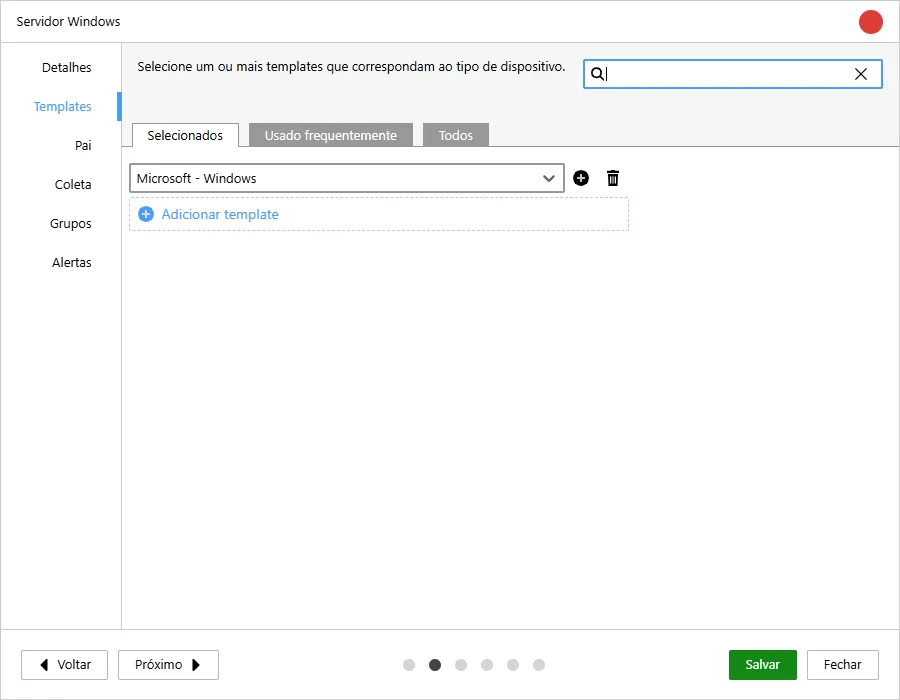
Section titled “Configuration in Monsta”Within Monsta, when creating a device, just configure it to use the Microsoft templates.
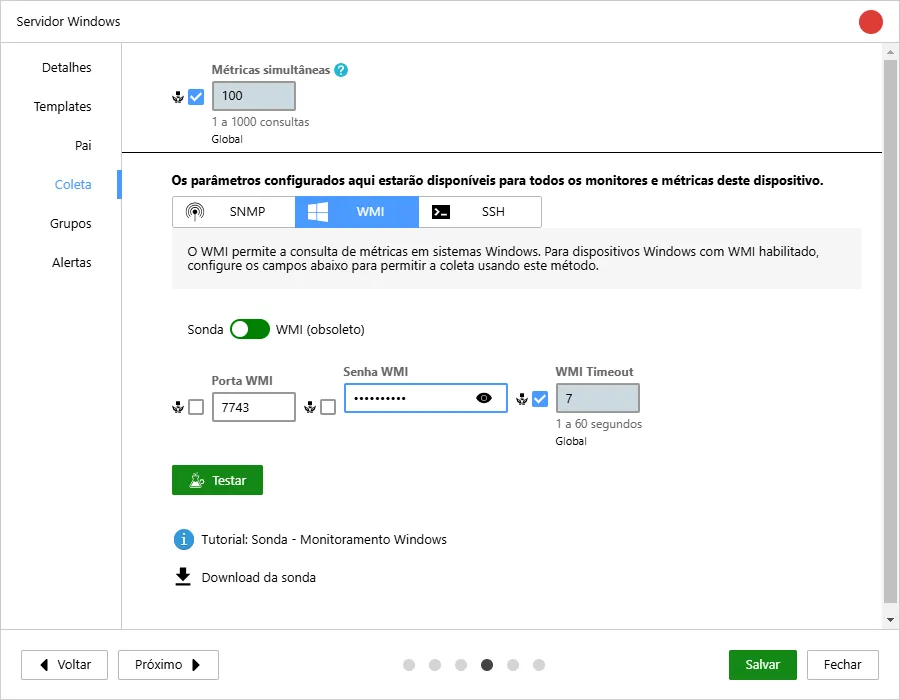
And fill the “WMI User” field with any information (it will be discarded later) and the “WMI Password” field with the password provided during the probe installation.
After creating the device you can already use the monitors available in the template.