
Top Bar Features
Besides the links to each screen, there are features available in Monsta’s top bar.
Information
Section titled “Information”
In the top-right corner, Monsta displays information about the resources available in the system.
| Ícone | Descrição |
|---|---|
 | SMS: This field shows the number of SMS messages available to be sent in case of a status change of any device or monitor. |
 | E-mail: This field shows the number of emails available to be sent in case of a status change of any device or monitor. |
 | Notice Center: Indicates when there are messages about Monsta. |
 | Cloud Communication: This field shows whether Monsta is communicating with the Cloud at https://mind.monsta.com.br. This communication is used for sending alert SMS and emails, for automatic backup of configurations, and for restoring the backup. |

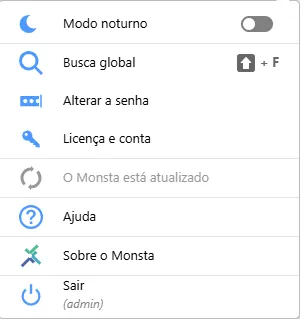
- Dark mode: Feature that inverts the colors of Monsta’s screens.
- Global search: Performs a search for the requested words across Monsta’s entire data structure.
- Change Password: Allows changing the current user’s password.
- License and account: Returns information about the license in use.
- Updates: Allows updating Monsta when a new version is available.
- Help: Takes you to Monsta’s Wiki page.
- About Monsta: Returns information about the current software version. In this option you can also change the user to whom your license belongs.
- Logout: Logs out of the system.