
Monitoring Internet Link Quality: Inverting Alert Limits
When monitoring the speed or performance of your internet link (such as throughput), you want to be alerted when the speed falls below an acceptable value.
Traffic monitors in Monsta, by default, assume that the higher the value, the worse the problem. But you can invert this logic to monitor your link so it works with: the lower the value, the worse the problem.
Use the Invert Limits feature to apply this logic:
Inverting the Logic
Section titled “Inverting the Logic”To ensure you receive alerts when the speed falls below the minimum acceptable, follow these steps:
- Click on the traffic monitor;
- Click the “Edit” button;
- Click the “Invert Limits” button
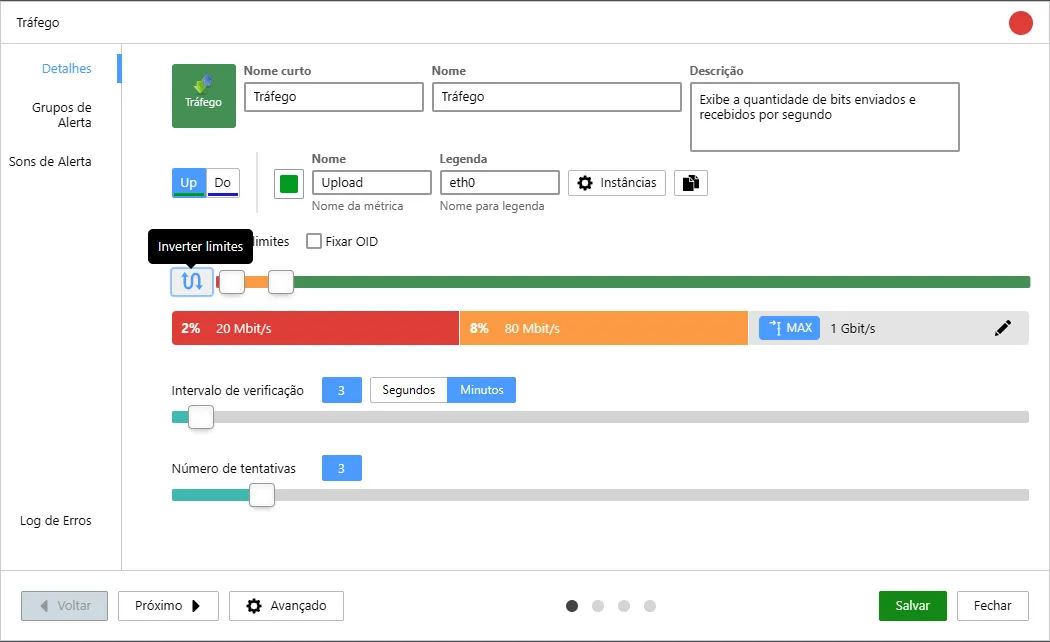
- Adjust the percentage bars to choose the thresholds at which you want to be alerted.
In the example image above, the monitor is set to alert for a 1G link in the following situations:
| Field | Example Value | Objective |
|---|---|---|
| Critical Threshold | 2% | Monsta will send a critical state alert if traffic is below or equal to 20 Mbps. |
| Warning Threshold | 8% | Monsta will send a warning alert if traffic is between 80 Mbps and above 20Mbps. |
After defining your thresholds, click the Save to record your changes button.