
The Agent Communication Architecture
The Monsta Agent is software installed directly on devices (end-points) to enable collection of internal metrics and monitoring of geographically distributed networks. Its main function is to act as a secure data tunnel, eliminating dependence on complex network infrastructures such as VPNs.
Installation
Section titled “Installation”The agent installation was designed to be Zero Conf. This means the software is engineered to work immediately after installation, without the user needing to perform manual adjustments.
Step-by-step installation:
- Download: Visit the official Monsta Downloads page and download the version compatible with your operating system.
- Execution: Run the installer on the server or workstation you want to use as the main point.
- Binding: When prompted, provide the License Key of your Monsta server to establish encrypted communication. The key can be obtained in the Configuration -> Agents menu.
Once connected, the device will automatically appear in the devices menu for monitor configuration. To monitor devices on the remote network, simply add them under the agent in the hierarchy.
Connection
Section titled “Connection”The Monsta Agent offers flexibility in how it communicates with the Monsta Server, allowing connection in two ways: Direct or via our platform’s Proxy Servers. This is determined automatically by the protocol during the communication process.
Direct (Recommended)
Section titled “Direct (Recommended)”Direct connection is the default and most efficient communication method for the Monsta Agent.
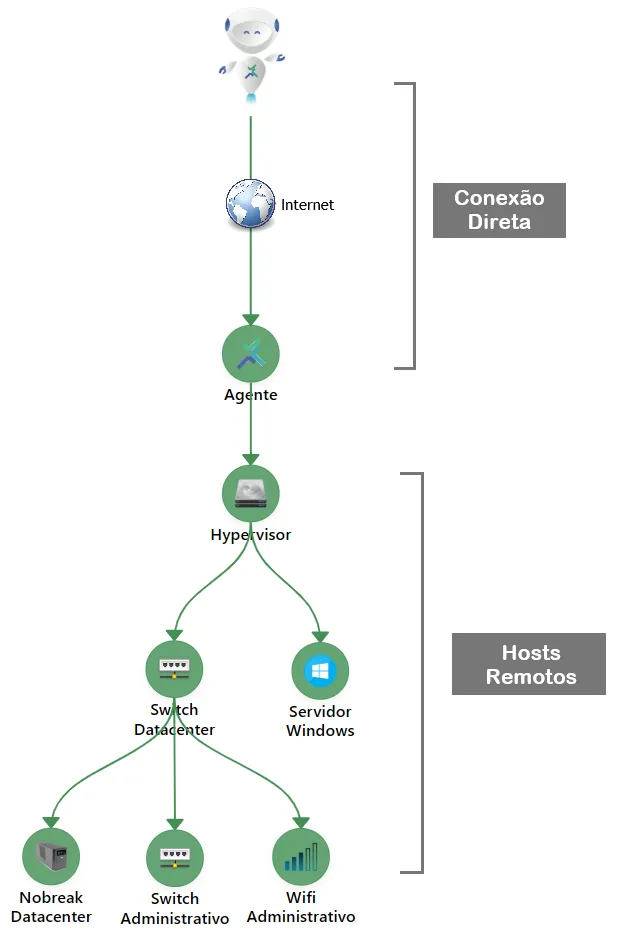
How It Works
Section titled “How It Works”In this mode, the Agent installed on the remote network establishes a secure point-to-point communication (using the QUIC protocol) directly with the Monsta Server.
- Flow: Remote Agent -> Internet/WAN -> Monsta Server.
- Requirement: The Monsta Server must have the communication port 58580/UDP (outbound) available to the internet.
Advantages (Why It Is the Best Option?)
Section titled “Advantages (Why It Is the Best Option?)”| Advantage | Description |
|---|---|
| Pure Performance | Metric traffic takes the shortest possible path, resulting in lower latency and faster response times for event detection. |
| Simple Security | The QUIC tunnel encrypts communication end-to-end, without intermediaries, ensuring only the Monsta Server can decrypt the data. |
| Greater Resilience | QUIC is optimized to handle packet loss and network changes. In direct connections, its resilience is maximized, ensuring fewer disconnects. |
| Fewer Points of Failure | The absence of an intermediate server means there are only two points to manage (Agent and Monsta Server), reducing complexity and potential bottlenecks. |
Connection Via Monsta Platform Proxy Servers
Section titled “Connection Via Monsta Platform Proxy Servers”This option is provided for environments with network restrictions where the Monsta Server does not have communication on port 58580/UDP to the internet.
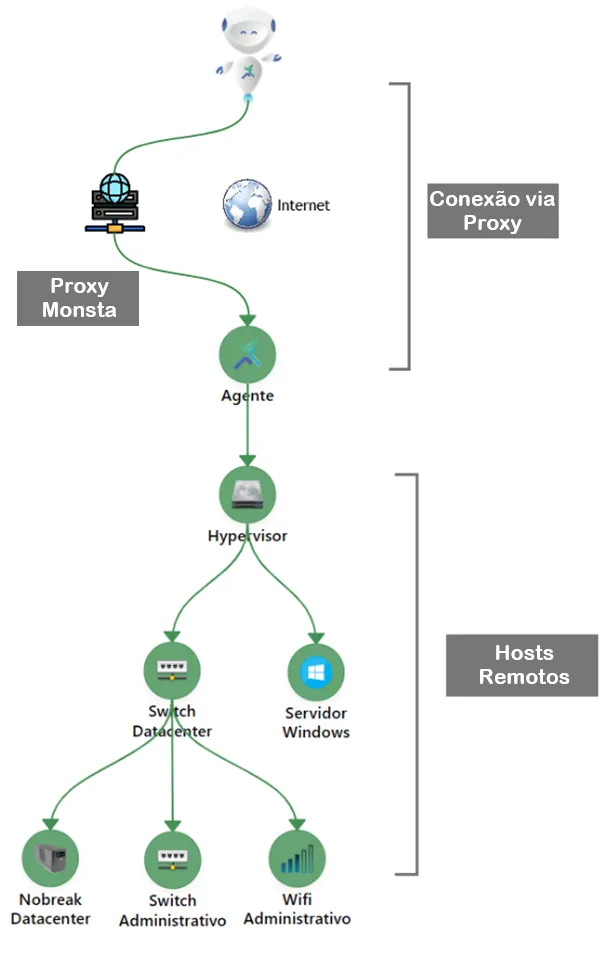
How It Works
Section titled “How It Works”In this mode, the Agent connects to one of the proxy servers maintained by our platform. This intermediary server receives the agent’s traffic and forwards it to the Monsta Server.
- Flow: Remote Agent -> Internet/WAN -> Monsta Proxy Server -> Main Monsta Server.
Disadvantages and Why to Avoid It (If Possible)
Section titled “Disadvantages and Why to Avoid It (If Possible)”Although it offers flexibility, using a proxy should be considered only as a last resort due to the following disadvantages compared to Direct Connection:
| Disadvantage | Impact |
|---|---|
| Increased Latency | Traffic must pass through one additional intermediate node. This increases response time and can delay detection of critical failures. |
| Potential Bottleneck | The proxy server can become a performance bottleneck if many agents are connected simultaneously, overloading traffic processing. |
| More Points of Failure | Adding an intermediary server increases the number of components that can fail, affecting the stability of your monitoring. |
| Difficulty in Troubleshooting | The network path complexity is greater, making it harder to identify where a connection or latency problem is occurring. |
Compatibility with NAT and Dynamic IPs
Section titled “Compatibility with NAT and Dynamic IPs”The Monsta Agent was specifically architected to overcome common challenges in remote networks, such as the use of NAT (network address translator) and assignment of dynamic IP addresses.
Operation in NAT Environments
Section titled “Operation in NAT Environments”NAT is the technology that allows multiple devices on a local network (which have private IPs, like 192.168.x.x) to share a single public IP address.
-
Traditional Problem: Tools that attempt to initiate the connection from outside (from the central server to the remote device) fail because NAT blocks inbound connections and the private address is not routable.
-
Monsta’s Solution: The Monsta Agent always initiates the connection from inside the remote network (the Agent host) to the Monsta Server (which has a known IP in our cloud).
This method of “outbound connection” (outbound) allows the Agent to “traverse” the remote network’s firewall and NAT without requiring complex configurations such as Port Forwarding.
Tolerance to Dynamic IPs
Section titled “Tolerance to Dynamic IPs”Remote home networks or small branch offices often use public IP addresses that change periodically (Dynamic IP), provided by the internet service provider.
-
QUIC Protocol: The agent’s ability to handle dynamic IPs is ensured by using the QUIC protocol.
-
Connection ID: Unlike TCP, which identifies the connection by the IP:Port pair, QUIC uses a Unique Connection ID. If the Monsta Agent is active and your network’s public IP address changes:
- The Main Monsta Server does not terminate the session.
- The agent simply resumes sending data using the new public IP address.
This means that even if your branch’s IP changes, the Agent Connect secure connection is maintained, ensuring continuous and uninterrupted monitoring.
Data Cache
Section titled “Data Cache”Overview
Section titled “Overview”The Data Cache feature ensures that monitoring of remote networks remains uninterrupted and complete, even during failures or interruptions in communication with the Monsta main server.
The remote Agent includes a Cache mechanism that stores locally all collected metrics while the connection is unavailable. This eliminates the loss of critical data and ensures historical integrity of monitoring.
Operating Mechanism
Section titled “Operating Mechanism”The caching process operates as follows:
- Failure Detection: The Agent actively monitors connectivity with the Monsta server. When it detects a communication failure (e.g., timeout, network error), the Agent automatically writes the data to the local machine’s cache.
- Cached Storage: During the disconnection period, all network metrics (traffic, latency, device status, etc.) are collected normally and stored in a persistent queue on the Agent’s local disk.
- Synchronization (Reconnection): As soon as communication with the Monsta server is reestablished, the Agent automatically initiates Synchronization. The data stored in the cache is transmitted to the server, respecting the original chronological order. After successful transmission, the data is removed from the local cache.
When to Use the Agent
Section titled “When to Use the Agent”The Monsta Agent was developed to overcome limitations imposed by complex and distributed network architectures. It acts as an intelligent data collector, enabling comprehensive and efficient monitoring in various situations, such as those highlighted below:
Monitoring Remote Networks (Without VPN)
Section titled “Monitoring Remote Networks (Without VPN)”The Agent eliminates the need to configure and maintain complex Virtual Private Networks (VPNs) or tunnel solutions to monitor external environments simply and securely.
Monitoring in Environments with Port Restrictions (No Port Forwarding)
Section titled “Monitoring in Environments with Port Restrictions (No Port Forwarding)”In environments with strict security policies (such as customer data centers or highly segmented networks), it is often not possible to open or forward ports so that the Monsta server can directly access devices. The Agent does not require port forwarding.
Monitoring Networks with the Same Address Range
Section titled “Monitoring Networks with the Same Address Range”One of the major differentiators of the Monsta Agent is the ability to monitor different clients or units that use the same IP addressing range (e.g., 10.0.0.0/16) without any conflict.
Intelligent Distribution of Collection Processing
Section titled “Intelligent Distribution of Collection Processing”For large infrastructures with thousands of items being monitored, the Agent allows decentralizing the data collection workload from the main server. By distributing collection tasks across multiple Agents, you ensure the Monsta server focuses only on storage and visualization, allowing the system to scale processing horizontally.