
Services
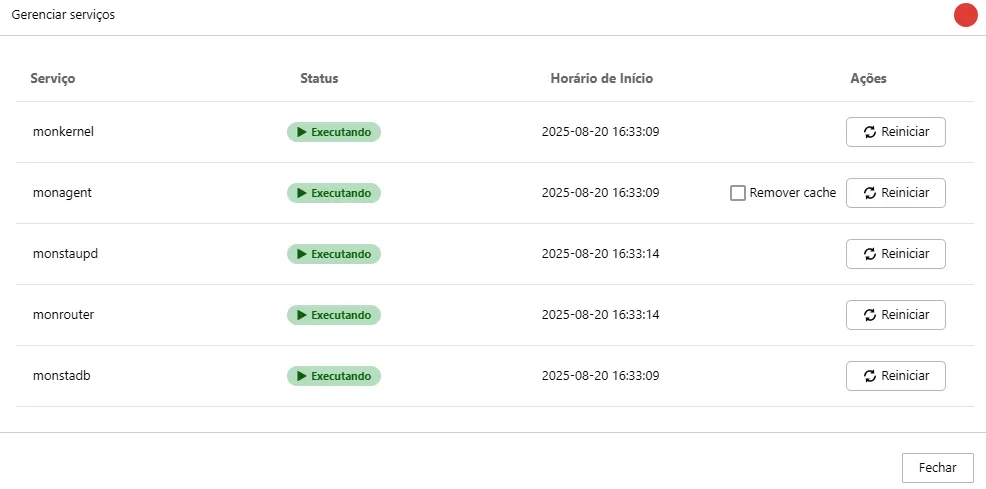
The Manage Services screen provides an overview of the status of the services essential for Monsta’s operation. It allows you to monitor and manage each service individually, ensuring the system runs without interruptions.
How to Use
Section titled “How to Use”On this screen, you will see a list of services, each with the following information:
- Service Name: The name of the running service.
- Status: The current state of the service, indicated by a status icon. The most common statuses are:
- Green: The service is active and functioning correctly.
- Red: The service is inactive or experiencing an issue.
- Start Time: Shows the date and time when the service was started.
- Actions: In this column, you will find the button to restart the service.
- Restart: Click this button to restart a specific service. This can be useful to resolve isolated issues without needing to restart the entire system.
Services
Section titled “Services”| Serviço | Descrição |
|---|---|
monkernel | It’s the core of the system, responsible for logs and the interface between the other services and the database. |
monagent | Responsible for collecting information from devices. |
monstaupd | It’s the subsystem that periodically checks for new Monsta updates. |
monrouter | It’s the HTTP server responsible for providing the HTTP interface to the user. |
monstadb | Database of collected information. |